
UV Flatbed Printer Buying Guide Malaysia: What to Check in 2026
A practical guide for Malaysian print shops, signage companies and product customisers comparing UV flatbed printers for their next investment.
The wrong UV flatbed printer can become expensive long before the machine actually breaks down. Buy one that's too small and larger jobs become a problem. Go too big for your actual workload and you're paying for capacity, floor space and equipment you may barely use. This UV flatbed printer buying guide helps Malaysian businesses work out what really matters before committing.
Forget choosing based on print speed or price alone. Your products, substrate size, material compatibility, ink configuration, production volume and technical support will usually matter far more once daily production begins.
Quick Summary: A UV flatbed printer makes sense for businesses that need to print directly onto compatible rigid or semi-rigid products such as acrylic, signage boards, promotional items and décor. The right machine should be chosen around your actual product dimensions and workload: compact models suit smaller products, while larger flatbeds suit businesses handling bigger sheets, panels or higher production volumes.
Key Takeaways
- Measure the products you actually sell before deciding how large your print bed needs to be.
- Test your real substrates because ink adhesion can vary even between materials that look similar.
- White ink, varnish and primer are useful only when your applications genuinely require them.
- Calculate consumables, maintenance and possible downtime instead of comparing machine price alone.
- Installation, operator training, spare parts and local technical support should be part of the buying decision.
Table of Contents
- What Is a UV Flatbed Printer?
- What Can You Print With a UV Flatbed Printer?
- Which Materials Can You Print On?
- Where Does UV Flatbed Printing Have Limits?
- How Big Should Your UV Flatbed Printer Be?
- Do You Need White Ink, Varnish or Primer?
- AC-FB6090 vs AC-FB2513
- What Should You Check Before Buying?
- What Will the Printer Cost to Own?
- Why Does Local Support Matter?
- UV Flatbed Printer FAQ
What Is a UV Flatbed Printer?
A UV flatbed printer is a digital printer that places UV-curable ink directly onto a compatible product or sheet material positioned on a flat printing bed. UV light cures the ink during the printing process, so the printed surface can normally be handled shortly after production.
That direct-to-substrate workflow is what makes UV flatbed printing useful for signage shops, acrylic fabricators, display suppliers and businesses producing customised products.
Instead of printing a graphic onto another medium and then mounting or transferring it, suitable jobs can be printed directly onto the final substrate.
Direct Answer for Buyers
If most of your work involves flat products, rigid sheets or suitably positioned customised items, a UV flatbed printer is worth considering. But choose the machine around the products you expect to print every week—not the largest specification you can afford.
What Can You Print With a UV Flatbed Printer?
This is where UV flatbed printing becomes interesting for businesses that want to expand beyond one type of signage or print job.
Depending on the printer, ink system and material compatibility, one machine may support applications such as:
- Acrylic signage and displays
- Retail and point-of-sale displays
- Promotional products
- Phone cases
- Personalised gifts and plaques
- Wooden décor and decorative panels
- Packaging prototypes
- Glass and ceramic products
- Selected metal nameplates and products
- Furniture and interior panels
- Advertising boards and display materials
For a print shop, that can mean using the same production platform for an acrylic sign today, customised promotional pieces tomorrow and decorative panels on the next job.
The catch? Being able to physically place a product on the printer does not automatically mean the ink will adhere properly to it.
Which Materials Can a UV Flatbed Printer Print On?
UV flatbed printers can work with many materials, but material compatibility should never be assumed.
Common substrate groups include:
- Acrylic and plastics: acrylic sheets, PVC and selected plastic products.
- Wood and MDF: signage, decorative products and furniture-related panels.
- Glass and ceramics: selected glass products, tiles and decorative pieces.
- Metal: aluminium and selected coated or prepared metal surfaces.
- Leather: suitable leather products and personalised items.
- Stone and slate: plaques, coasters and decorative products.
- Paper and board: selected packaging, display and prototype applications.
Surface finish matters. Two products made from a similar material can still behave differently because of coatings, treatments or surface energy.
Don't Skip the Sample Test
Bring the exact substrate or product you plan to sell and test it before buying. Check adhesion, scratching, colour, curing and final appearance. A successful print on a supplier's standard acrylic sample does not guarantee identical results on your own material.
Where Does UV Flatbed Printing Have Limits?
A UV flatbed printer is versatile, but it isn't a machine for absolutely every object.
- Cylindrical products: bottles and tumblers may require a compatible rotary attachment or another printing solution.
- Very uneven surfaces: major height differences can affect printhead clearance and print quality.
- Difficult plastics: certain low-surface-energy materials may require treatment or primer.
- Highly reflective substrates: these may require additional testing and suitable operating procedures.
- Unproven materials: adhesion and durability can vary significantly between products.
This is why buying based on a long list of advertised materials can be risky. Your own samples tell you much more than a generic compatibility chart.
How Big Should Your UV Flatbed Printer Be?
Here's one of the easiest mistakes to make: assuming a bigger machine is automatically a better investment.
It isn't. The best print-bed size is the one that matches the dimensions and production volume of the work you expect to sell.
A smaller UV flatbed usually makes more sense when:
- You mainly produce smaller customised products.
- Your jobs fit comfortably within a compact print area.
- Workshop space is limited.
- You are adding UV printing as a new service.
- Your production volume is still developing.
A larger UV flatbed becomes more useful when:
- You regularly handle large signs or boards.
- You print furniture or decorative panels.
- You want to position multiple products in one production setup.
- Your daily workload justifies the larger working area.
- Larger substrates are already part of your existing business.
Measure your largest common product—not the biggest job you've handled once in the past three years. Then consider how much growth you realistically expect.
Do You Need White Ink, Varnish or Primer?
Ink configuration can open up new applications, but adding every available option is not automatically better.
CMYK
CMYK provides the standard colour foundation for normal full-colour UV printing.
White Ink
White ink becomes useful when printing on transparent, coloured or dark substrates. It can act as an underbase or form part of layered printing effects.
Varnish or Clear Ink
On compatible systems, clear or varnish ink can add selected glossy highlights, visual effects or textured areas.
Primer
Certain substrates may need primer or other surface preparation to improve adhesion. Whether this is required depends on the material, its finish and the ink system.
The better question isn't “How many ink options does this machine have?” It is “Which of these options will customers actually pay me to use?”
AC-FB6090 vs AC-FB2513: Which Size Fits Your Business?
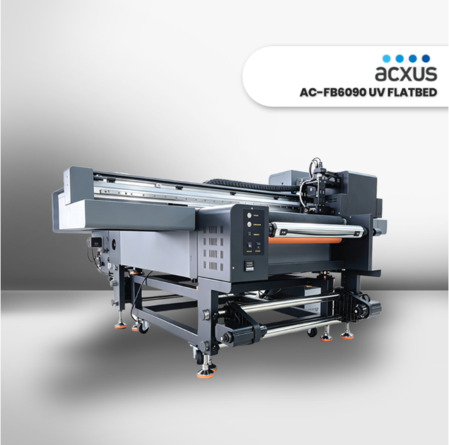
ACXUS offers different UV flatbed formats for businesses with very different production needs. The AC-FB6090 UV Flatbed Printer is positioned as a more compact option, while the AC-FB2513 UV Flatbed Printer provides a much larger working area.
| What to Compare | AC-FB6090 | AC-FB2513 | Buyer Fit |
|---|---|---|---|
| Print table | 900 × 600 mm | 2,500 × 1,300 mm | Choose around your common product dimensions |
| Machine positioning | Compact UV flatbed | Larger industrial UV flatbed | Depends on floor space and workload |
| Typical applications | Customised products, phone cases, acrylic items and promotional products | Large signage, boards, panels and larger-format production | Match the machine to your main revenue-producing jobs |
| Typical buyer | SMEs, workshops, startups and product customisers | Commercial printers and businesses handling larger substrates | Consider present volume plus realistic growth |
| Current configuration | Confirm latest specification with ACXUS | Confirm latest specification with ACXUS | Verify printhead, ink and software before ordering |
Neither machine is automatically the better choice. If most of your profitable jobs fit comfortably on a 900 × 600 mm bed, buying a much larger printer simply because it looks more industrial may not improve your business.
On the other hand, repeatedly turning away large board or panel work because your machine is too small creates a different problem.
What Should You Check Before Buying a UV Flatbed Printer?
1. Start with the products you want to sell
Don't begin with printer specifications. Write down your five or ten most important products first.
Record the material, dimensions, thickness, surface type and typical order quantity. That simple exercise can eliminate machines that don't fit your actual workflow.
2. Look at your real production volume
A machine that works well for occasional customised pieces may not suit a business running production jobs throughout the day.
Think about normal workload and peak periods. The printer should support your busy days without forcing you to buy far more capacity than you normally use.
3. Check print area and product clearance
Measure the length, width and height of your common products. You also need to consider how operators will position and secure them during printing.
4. Decide which ink capabilities make money
White ink and varnish can add valuable applications, but only when your customers need those effects. Ask for demonstrations using jobs that resemble the work you expect to sell.
5. Review the RIP software and workflow
RIP software can affect colour management, white layers, varnish layers and job preparation. Check whether the supplied workflow is practical for your operators rather than treating software as an afterthought.
6. Ask for a sample using your own artwork
Bring your product and artwork whenever possible. A real test lets you judge colour, adhesion, finish and production practicality before making the investment.
7. Ask what happens after installation
Installation is only the beginning. Ask who handles training, maintenance questions, spare parts, ink supply and technical troubleshooting when the printer is already part of your production line.
What Will a UV Flatbed Printer Really Cost to Own?
The machine price gets most of the attention during quotation comparison. Once production starts, other costs become just as important.
Your calculation should include:
- UV ink
- Printheads and other consumables
- Cleaning and maintenance materials
- RIP software where applicable
- Electricity
- Installation and training
- Replacement parts
- Preventive maintenance
- Potential production downtime
Regular nozzle checks, proper cleaning and manufacturer-recommended maintenance also matter. White ink systems in particular should be maintained according to the machine manufacturer's instructions.
A cheaper purchase can stop looking cheap if support is difficult to obtain or production stops while waiting for a critical part.
Why Does Buying From a Malaysian Supplier Matter?
A commercial UV printer in Malaysia is not the same as buying an ordinary office printer and plugging it in.
Installation, calibration, operator training, ink setup and ongoing maintenance can all affect how successfully the machine fits into your business.
Before placing an order, ask the supplier about:
- Machine demonstrations
- Sample printing with your own material
- Installation and calibration
- Operator training
- Warranty coverage
- Ink and consumable availability
- Spare parts
- Technical troubleshooting
- Preventive maintenance
At ACXUS, the discussion can start with the job rather than the machine. Tell the team what you print, what size it is and how much you expect to produce, then compare the available UV flatbed options from there.
Not Sure Which UV Flatbed Size Fits Your Jobs?
Send ACXUS your product type, material, dimensions and estimated production volume. If possible, prepare an actual sample so the team can discuss a suitable machine and arrange print testing before you buy.
FAQ: Buying a UV Flatbed Printer in Malaysia
What is a UV flatbed printer mainly used for?
A UV flatbed printer is mainly used to print directly onto compatible flat products and rigid or semi-rigid substrates. Common applications include acrylic signage, displays, customised products, promotional items, décor, packaging prototypes and selected boards or panels.
Can a UV flatbed printer print directly on acrylic?
Yes, acrylic is a common UV flatbed printing application. White ink may also be used for transparent, coloured or dark acrylic, but the exact acrylic surface should still be tested for adhesion and final appearance before commercial production.
Can a UV flatbed printer print on glass and metal?
Suitable glass and selected metal substrates can be used with UV printing, but adhesion depends on the surface, coating, ink system and preparation. Some jobs may require primer or another surface treatment, so sample testing is important.
Can I use a UV flatbed printer for bottles or tumblers?
A normal flatbed is primarily designed for flat or suitably positioned substrates. Cylindrical products such as bottles and tumblers may require a compatible rotary attachment or a printing system designed for cylindrical objects.
Is a compact UV flatbed printer enough for a small business?
It can be if your products fit the print area and your production volume is suitable. A compact machine such as the AC-FB6090 may suit smaller customised products and workshops, while businesses handling large panels or signage should consider a larger working area.
What is the difference between the AC-FB6090 and AC-FB2513?
The main difference is their working size and intended production use. The AC-FB6090 has a listed 900 × 600 mm print table for more compact applications, while the AC-FB2513 has a listed 2,500 × 1,300 mm table for larger-format work. Confirm the latest machine configuration with ACXUS before purchasing.
Do I need white ink and varnish on a UV flatbed printer?
Not every business needs every ink option. White ink is useful for transparent, dark or coloured materials, while varnish can add selected visual or textured effects. Choose the configuration based on applications your customers actually require.
What should I test before buying a UV flatbed printer?
Test your actual material, artwork and product whenever possible. Check print quality, colour, adhesion, scratching, curing, loading method and production time so you can see whether the machine suits your real workflow instead of relying only on specifications.
Related ACXUS Links
UV Flatbed Printer UV Printing UV Printer Malaysia Printing Machine Signage Business